Deploy, run, and secure your apps
on servers you own.
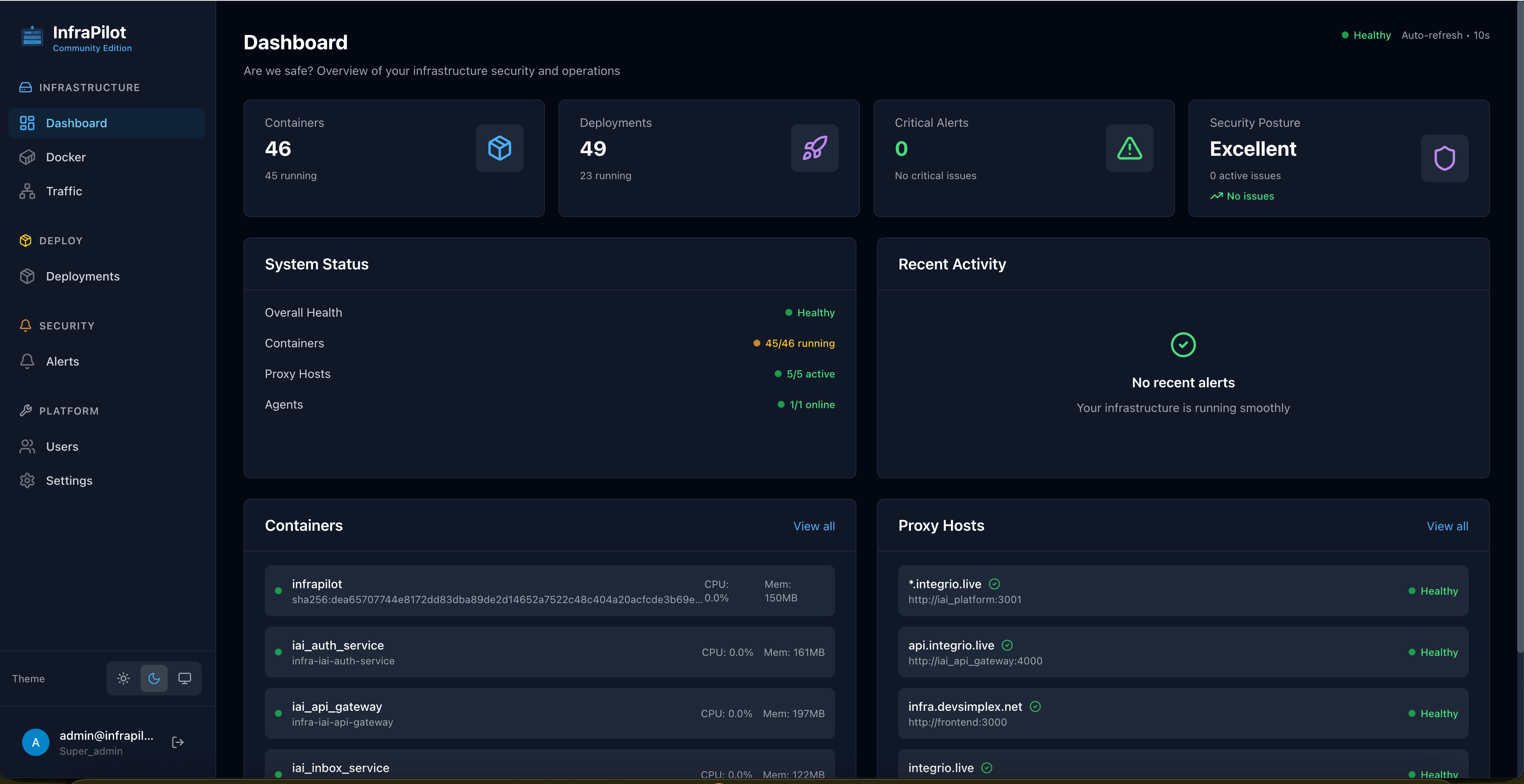
InfraPilot is a self-hosted platform for push-to-deploy, monitoring, and security, manage Docker containers, the Nginx reverse proxy, SSL certificates, logs, and alerts from a single UI. One container, no agents to wire up. Free and open-source.
curl -fsSL https://get.infrapilot.sh | bashFree Community Edition · AGPL-3.0 · One server, one container
Running a team or multiple servers? Explore InfraPilot Pro →
Runs on the stack you already trust
The Problem
Debugging infrastructure shouldn't feel like archaeology
Every incident means jumping between Nginx logs, the Docker CLI, an SSL tool, and an alerting inbox, with no thread connecting them.
502 Bad Gateway
Check Nginx logs
Container crash
Open Docker CLI
SSL expiring
Another tool
Alerts fire
No context
The Solution
InfraPilot connects the dots
Traffic, containers, logs, and alerts live in one control plane, so when something breaks you trace it from symptom to root cause in seconds, not hours.
Ship · Secure · Govern
Deploy fast. Stay secure. Prove it.
Three jobs, one platform: ship apps to your servers, secure them before they go live, and govern what runs in production. Community Edition is free, Pro and Enterprise unlock the rest.
Deploy & Roll Back
Push-to-deploy from the CLI or your CI pipeline, with live build/health logs, and one-click rollback when something's off.
- Deploy from CLI or CI/CD
- Live logs + health-gated rollouts
- One-click rollback
Proxy & SSL Automation
Manage Nginx reverse proxies and Let's Encrypt SSL from a single dashboard, no config files, no Certbot cron jobs.
- Nginx proxy management
- Auto SSL via Let's Encrypt
- Rate limiting & IP rules
Containers, Logs & Metrics
Real-time visibility into every container, status, metrics, unified Docker + Nginx logs, and a web terminal.
- Container metrics & health
- Unified Docker + Nginx logs
- Web terminal (exec)
Scan Before You Ship
Continuous CVE scanning and network-exposure analysis across your stack, catch risks before an image reaches production.
- CVE vulnerability scanning
- Network exposure analysis
- Security posture score
Secrets Management
Detect hardcoded secrets, track rotation history, and migrate to an encrypted secrets store, all from one dashboard.
- Hardcoded secret detection
- Rotation tracking
- Encrypted secrets store
Govern & Comply
Prove what runs in production: policy gates before deploy, a full audit trail, SSO, SBOMs, and data governance at scale.
- Policy gates + deploy audit log
- SSO / SAML / OIDC
- SBOM + data governance
Who It's For
Built for teams who ship
Whether you're a solo founder or a growing team, InfraPilot scales with your infrastructure, without scaling its complexity.
SaaS Founders
Running multiple Dockerised services on a single server? Get full visibility without the complexity.
DevOps Teams
Want observability without SSH access? Control your infrastructure through the Docker API.
Agencies
Managing client apps on shared infrastructure? One dashboard for all deployments.
Solo Engineers
Want Nginx + Docker + observability in one place? Stop juggling multiple tools.
Architecture
Clean, Docker-native design
One container per server. Everything bundled inside, no extra software on your host, no SSH access, no agents to wire up.
Docker-native
Talks to Docker directly, zero SSH access to your host
All-in-one image
One container per server, nothing else to install
Secure by default
Least-privilege, read-first, fully auditable
 InfraPilot
Everything bundled in a single image, nothing else to install on your server.
Reverse proxy + SSL
Automatic HTTPS for every app
Deploys & rollbacks
Ship, roll back, manage
Metrics, logs & alerts
Full visibility in one place
Built-in storage
No external database to run
Docker on your host
Least-privilege, read-first access
Security
Secure by design
InfraPilot is not a server admin panel. It's a production-safe deployment platform, least-privilege from the first request.
Production-safe by default
Opinionated security for real workloads, no host SSH, no Linux user management, every action explicitly gated and auditable.
Comparison
How InfraPilot compares
Replace a pile of single-purpose tools, and trim the managed-PaaS bill while you're at it.
| Feature | InfraPilot | NPM | Portainer |
|---|---|---|---|
| Reverse Proxy | |||
| SSL Automation | |||
| Container Exec | |||
| Unified Logs | |||
| RBAC + MFA | |||
| Security Posture | |||
| Docker Native | Partial |
Coming from a managed PaaS? See InfraPilot vs Render, Railway & Heroku →
Quick Start
Up and running in minutes
One license key. One Docker image. Full visibility into your infrastructure.
Get your free license key
Sign up at infrapilot.org/signup, no credit card required. Your CE key arrives instantly.
# Register at infrapilot.org/signup
# Your key looks like: IP-CE-XXXX-XXXX-XXXX
Run the one-line installer
The script pulls the Docker image and starts InfraPilot automatically on your server.
curl -fsSL https://get.infrapilot.sh | bash
Open the dashboard & activate
Visit your server in a browser. Create your admin account, paste your license key, and you're live.
# Open http://your-server-ip in your browser
# Create admin account → paste license key → done!
Update anytime
To update InfraPilot to the latest version, simply re-run the same installer command.
# Update to latest version
curl -fsSL https://get.infrapilot.sh | bash
Community driven
Built in the open, for teams who value transparency. Source-available with a free license key for self-hosting, no credit card, no lock-in.
Is InfraPilot really free?
Yes. The Community Edition is completely free. You just need a free license key from infrapilot.org/signup. No credit card required, no time limit.
Do I need to install it on every server?
Yes, one InfraPilot container per server you want to manage. The all-in-one image bundles Nginx, the Go backend, Next.js frontend, agent, PostgreSQL, and Redis, everything in a single Docker container.
Does InfraPilot need SSH access to my servers?
No. InfraPilot communicates exclusively through the Docker socket. No SSH keys, no host-level access, no extra firewall rules beyond ports 80 and 443.
Can I manage multiple servers from one dashboard?
The Community Edition supports 1 agent (server). Professional supports up to 10, and Enterprise is unlimited. Each server runs its own InfraPilot container with its own dashboard.
What's the difference between Community and Professional?
Community covers core infrastructure, containers, reverse proxy, SSL, traffic analytics, alerts, and monitoring. Professional ($19/mo) adds CVE vulnerability scanning, secrets management, and code quality tools.
What are the system requirements?
Docker Engine 20+ on any Linux distribution. Minimum 512 MB RAM. Works on bare metal, VMs, Raspberry Pi, and any cloud provider, AWS, GCP, DigitalOcean, Hetzner, and more.
Pilot your infrastructure
with confidence.
Free, open-source Community Edition. One command, one server, under 5 minutes.
Get started freeAGPL-3.0 · Self-hosted · Your data stays yours · Need Pro?